What corner-to-corner crochet is, and why a pixel grid suits it
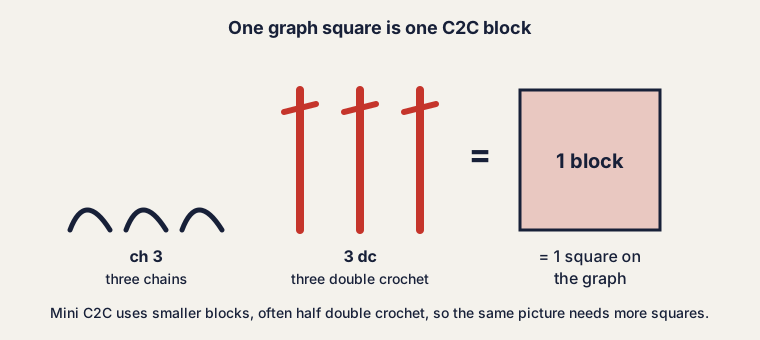
Corner-to-corner crochet, usually called C2C, is worked in diagonal rows of small blocks. You start at one corner with a single block. Each row adds one block until the work reaches the widest diagonal, then each row loses one block until a single block is left in the opposite corner. A standard block is a chain of 3 followed by 3 double crochet.
Every block is roughly square, so a C2C blanket behaves like a grid of colored pixels. That is why a picture converts so well: one cell of the graph is one block of the blanket. You decide the color of each cell, and the pattern is the list of those colors read along the diagonals.
Choose the width in blocks from the blanket size
Start from the size you want, not from the picture. Crochet a swatch of blocks, measure it, and count blocks across 4 in. The tool uses that count to turn a width in blocks into inches. The arithmetic is the same one you can do by hand: width in blocks × 4 ÷ blocks per 4 in.
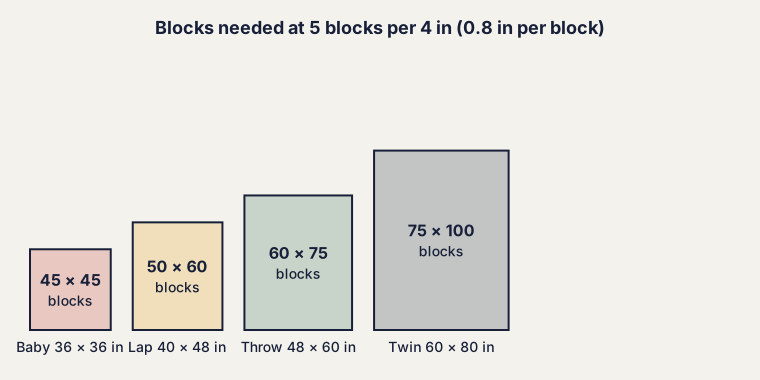
To go the other way, divide the width you want by the block size. A 48 in throw at 0.8 in per block needs 48 ÷ 0.8 = 60 blocks across. The table below does this for common blanket sizes at 5 blocks per 4 in. Each row count follows the W + H − 1 rule.
| Blanket (in, W × H) | Blocks (W × H) | Total blocks | Diagonal rows |
|---|---|---|---|
| Baby, 36 × 36 | 45 × 45 | 2,025 | 89 |
| Lap, 40 × 48 | 50 × 60 | 3,000 | 109 |
| Throw, 48 × 60 | 60 × 75 | 4,500 | 134 |
| Twin, 60 × 80 | 75 × 100 | 7,500 | 174 |
Your gauge may differ from 5 blocks per 4 in. Yarn weight, hook size and how tightly you work all change it. Bulky yarn is closer to 4 blocks per 4 in, which makes each block 1 in wide and the same 48 in throw only 48 blocks across. The size on the tool's blanket preview is only as accurate as the gauge you type in.
How many colors work in a C2C graph
The tool lets you pick between 2 and 12 colors. Fewer is easier. Each color you add is another yarn to manage, and every change of color inside a row means a new strand. As a rule, a graph with 3 to 5 colors is comfortable and 8 or more is a project for someone who likes bobbins.
The written rows show you the cost. Each entry is a count of blocks and a color letter, so a row with 7 entries has 6 color changes. If a picture produces rows with many one-block entries, lower the number of colors or raise the setting that tidies stray single blocks. Isolated single blocks are the usual source of the extra work.
Picture to C2C graphgan: how to use the graph maker
This C2C graph maker takes a picture, a word or a blank page. Pick a built-in sample to see how it behaves, or drop in a photo, drawing or logo you have the right to use. Simple pictures with strong shapes work best.
- Set the width in blocks from the table above or from your own sum.
- Choose a gauge preset or type your own blocks per 4 in, across and up.
- Set the number of colors and how strongly the tool should tidy stray single blocks.
- Fix details by hand with Draw, Fill and Pick. Undo and Redo are always there.
- Check the Blanket preview, then open Written rows.
When you are happy, download the chart as a PNG, or print it or save it as a PDF. The print version is tiled across pages and comes with a color key. A share link reopens the exact chart, and Knit mode highlights one row at a time with Back and Next buttons, which suits work on a couch.
C2C written instructions: how to read the diagonal rows
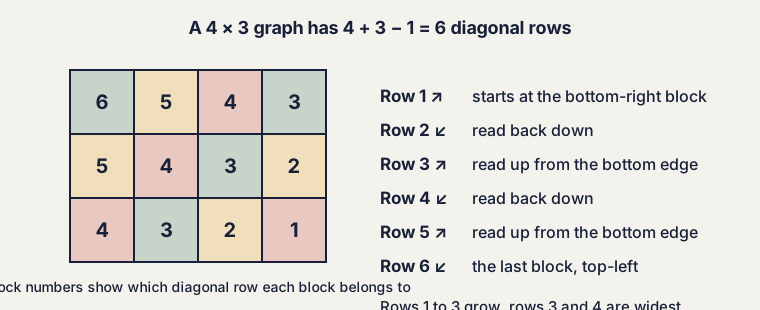
The tool's written rows follow the diagonals. Row 1 is the block in the bottom-right corner. Odd rows are read from the bottom edge up, shown with the arrow ↗. Even rows go back down, shown with ↙. Each entry is a count of blocks and a color letter.
A W × H graph has W + H − 1 rows. The rows grow until they reach the smaller of W and H. They stay at that width for |W − H| + 1 rows, then shrink. These are the increase section, the widest diagonals and the decrease section.
Mini C2C versus standard blocks
Mini C2C uses smaller blocks, commonly half double crochet, so more of them fit in the same space. The tool offers a preset at 7 blocks per 4 in, which makes each block 4 ÷ 7 = 0.57 in wide. At that size, 40 blocks give a piece only 40 × 4 ÷ 7 = 22.9 in wide. Mini blocks suit scarves, pillows and wall pieces, where more detail from a picture matters. Standard blocks suit blankets, where speed and drape matter more.
Managing bobbins and ends
Where a color appears in separate patches, keep each patch on its own bobbin or small ball and cut the yarn when you finish with it. If the same color returns within a couple of blocks, you can carry it loosely behind the work. A long carry puckers the fabric and snags, so for longer gaps start a new strand.
Ends add up quickly in a graph with many color changes. Leave tails of about 6 in and weave them in as you go. To cut the end count, lower the number of colors in the tool.
Rectangular graphs
A square graph has W = H, so only one diagonal is the widest. A tall or wide graph has a long run of full-width rows in the middle. Choose a picture with the proportions you want and set the width in blocks. The height follows from the picture.
What this tool does not do
The C2C tool estimates sizes from your gauge, not yarn. It does not account for how a color change affects tension, the border you add, or the way large blankets stretch under their own weight. Treat the numbers as a plan, make a swatch first, and measure again after the first few rows. For a related approach with single crochet, see the tapestry crochet pattern maker, or return to the knitting chart maker.
Questions crocheters ask
How do I turn a picture into a C2C graph?
Drop the picture into the tool above, set the width in blocks and the number of colors, then tidy the result with Draw, Fill and Pick. The Chart tab is your graph and the Written rows tab holds the diagonal instructions.
How many rows does a C2C pattern have?
A graph that is W blocks wide and H blocks high has W + H − 1 diagonal rows. A 40 × 50 graph has 40 + 50 − 1 = 89 rows.
Can I make a rectangular C2C graph?
Yes. The width slider sets the blocks across and the height follows the picture. If you need a different shape, change the picture before you load it, or add and remove cells by hand in the chart.
What block gauge should I enter?
Crochet a swatch of your blocks, then count how many blocks fit across 4 inches and up 4 inches. Enter both numbers. The presets (5, 7 and 4 per 4 in) are starting points, not promises.
Does the tool tell me how much yarn I need?
No. The C2C tool does not estimate yarn. Work a swatch, weigh it, and scale up by the number of blocks in your graph.
Is my picture uploaded anywhere?
No. The picture is processed in your browser and never leaves your device. There is no account to make.
Can I sell items made from a chart I create here?
Yes, the charts you make are yours. You are still responsible for having the right to use the picture, so logos and characters owned by others need their owners' permission.